

 MATFOR Activation Overview Demo Newsletters Visual Signal Activation Overview Demo MATFOR Trial Documentations Utilities and Tools Visual Signal Trial Documentations
| License Types |
| Price List |
| F A Qs |
| Technical Support |
| Online Forum |
| Maintenance |
| Company Profile |
| Partners |
| Contact Info. |
| Find a Channel |
| Join Our Channel |
| Company Information |
Product Information |
|
General Questions MATFOR
Visual Signal
Registration Questions MATFOR
Visual Signal License Questions MATFOR
Visual Signal
MATFOR Visual Signal |
|
Company Information Answers |
Q: How do I contact AnCAD? A: For product purchase, please write to our sales team at sales@ancad.com For technical support, please write to our technical team at support@ancad.com |
|
Product Information Answers |
General
Questions MATFOR Q: What is MATFOR? A: MATFOR contains a set of numerical and visualization libraries developed specially for scientists and engineers. The functions in the libraries enhance your Fortran and C++ programs with dynamic visualization capabilities, shorten your numerical codes and speed up your development process. Q: Who should use MATFOR? A: Scientists and engineers who are in need of speed and advanced visualization capabilities for their researches. Q: In which language is MATFOR written? A: MATFOR is written in Fortran and C++. It is based on industry-recognized visualization libraries VTK (Visual Tool Kit) and OpenGL and numerical library Intel MKL (Math Kernel Library). Q: What is the latest version of MATFOR? A: The latest version of MATFOR is version 4.0. Q: What are the supported platforms and requirements for MATFOR? A: Please refer to http://www.ancad.com/overview_6.html#overviewmenu for the most up-to-date system requirements. Q: Does MATFOR support multi-language? A: MATFOR 3.2 (windows only) allows users to input, modify and display character sets in different languages. Various symbols such as the Greek letters and the most frequently used mathematical signs are also enabled through this support. This feature is not yet available in version 4.0. Q: How can I try MATFOR? A: You can link to http://www.ancad.com/download.php to fill the form and download MATFOR 4.0 trial version. The trial key will be sent to you via e-mail within 24 hours. Q: How do I get started with MATFOR? A: The easiest way to learn MATFOR is to go through its documentation. MATFOR Quick Start Guide has all the image instructions from installation to the demonstration of how to run demo cases. In addition, our support team, which consists of engineers from several fields, provides supports in different aspects. If any question arises while using MATFOR, you can also send an email to support@ancad.com. Q: What are the support options I have for MATFOR? A: MATFOR users may download free documentations or use online forum to acquire support for MATFOR. Users who wish to receive direct email support, phone support, product updates and upgrades may purchase MMS at 20% of the product list price per year. Details on MMS can be refered to http://www.ancad.com/mms.html. Q: Where can I get the documents for MATFOR? A: MATFOR documents include Quick Start Guide, Reference Guide and Users Guide can be downloaded from the AnCAD Home Page at http://www.ancad.com/docs.html . Hard copy manuals can be obtained by sending your requests to support@ancad.com. Q: What is the advantage of using mfPlayer? (Compared to other media players) A: Unlike any other media player, mfPlayer captures picture frames, animates simulation results and even allows graphical manipulations. For instance, viewers can resize, rotate and change color maps while playing the video. For details, please see http://www.ancad.com/tools.html.
Visual Signal Q: What is Visual Signal? A: Visual Signal is a signal processing software that emphasizes simplicity, speed, and efficiency. The functions included allow for advanced analysis of signals that would normally require users to have knowledge on writing scripts to achieve the same functionality. Q: Who should use Visual Signal? A: Visual Signal caters to both power users and typical users. The intuitive interface grants all users the ability to analyze their data, no matter how complex. At the same time, the software is robust enough for power users to write their own scripts to be used in Visual Signal. Q: In which language is Visual Signal written? A: Visual Signal is written in C#. Q: What is the latest version of Visual Signal? A: The latest version of Visual Signal is version 1.5. Q: What are the supported platforms and requirements for Visual Signal? A: Please refer to (requirements website for Visual Signal) for the most up-to-date system requirements. Q: Does Visual Signal suppot multiple languages? A: Visual Signal 1.5 (Windows only) currently supports English, Traditional Chinese, and Simplified Chinese. Q: How can I try Visual Signal? A: You can go to (trial license website for Visual Signal) to fill out a form and download Visual Signal. The trial license will be sent to you via e-mail within 24 hours and will expire in one month. Q: How do I get started with Visual Signal? A: The easiest way to learn Visual Signal is to go through its documentation, demos, and videos. The Visual Signal Quick Start Guide has all the image instructions from installation to the demonstration of how to run demo cases. In addition, our support team, which consists of engineers from several fields, can provide support in many different aspects. If you have and questions while using Viusal Signal, you can also send an email to support@ancad.com Q: What are the support options I have for Visual Signal? A: Visual Signal users may download free documentation or use an online forum to request support for Visual Signal. Users may also send support questions to support@ancad.com Q: Where can I get the documents for Visual Signal? A: Visual Signal documents include a Quick Start Guide, Reference Guide and User guides can be downloaded from the Viusal Signal Home Page at (Visual Signal Documentation Website) Q: How do I setup the DoMATLAB module? Q: How do I use a certain module? A: Consulting the online reference guide will detail what each module does, its function, and how to use it. The reference guide is linked here (Online Reference) Registration Questions MATFOR Q: How do I obtain the license password for registration?A: The password can be obtained by submitting MATFOR Password Request Form in the product package to sales@ancad.com. You may also fax it to (886)2-2928-9364. Q: How do I register MATFOR trial version? A: You may register MATFOR by using the registration program which can be found in Start menu\Programs\MATFOR4\Utilities\Register MATFOR 4 in Fortran(or C++) for Windows users, or /usr/lib/matfor4/tools/reg_xxx for Linux users. After the program is run, choose the trial Version option and enter the expiration date and password given in the email. Q: Where can I find the Host ID of my system? A: MATFOR is node-locked to a machine's Host ID. Hence, the Host ID has to be provided during the registration. Under Windows environment: Go to 'Start menu\Programs\MATFOR4\Utilities\Register MATFOR 4 in Fortran (or C++)', and the Host ID of your local machine will be shown in the registration program. (See below) 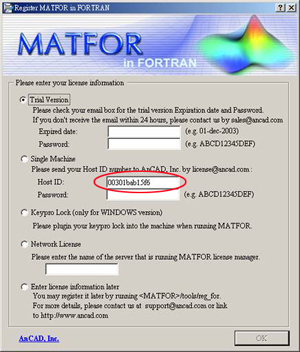 Under Linux environment: Go to /usr/lib/matfor4/tools/reg_xxx utility to retrieve Host ID. Q: Why do I get the error message "can't write to the registration file" during registration? A: This message may have occurred under the following conditions: 1) The system environment MATFORDIR is not set or set invalid, so the registration file cannot be created. Please refer to Quick Start Guide which instruction for setting environment path is provided. 2) User may not have full access to complete the registration. Make sure you are log in as root. Q:What should I do if I forget my password for registration? A: You can e-mail the information listed in MATFOR Password Request form to license@ancad.com. Once the information has been confirmed, a new set of password will be generated to you immediately. Visual Signal Q: How do I obtain a trial version of Visual Signal? A: To obtain a trial version of Visual Signal, you must send an e-mail to sales@ancad.com requesting for a trial version of Visual Signal. Once your e-mail has been sent, we will send an e-mail with a download link and a trial license file that expires in one month. Q: Where can I find the Host ID of my system? A: Visual Signal is node-locked to a machine's Host ID. Hence, the Host ID has to be provided during registration. To find your Host ID, first open Visual Signal. Go to help in the toolbar, and then click on license manager. Your Host ID will be the 32 character code on the top right corner of the license manager window. License Questions MATFOR Q: What is an Academic License?A: MATFOR Academic License is aimed for education use only. By all means, such license has to be installed on the computers of an university, an institute or a computer center for students, teachers and employee of the institute. Holders of such license are granted 12 months free maintenance service (MMS). For information on a pool of license, please send your requests to license@ancad.com. Q: What is a Commercial License? A: MATFOR Commercial License is aimed for commercial use for individuals or enterprises. Holders of such license are granted 12 months free maintenance service (MMS). For information on a pool of license, please send your requests to license@ancad.com. Q: What is a Runtime License? A: A Runtime License enables one or more end users to run an application created using MATFOR 4. This license may only be acquired after the Runtime License Request Form is submitted. Please note that the Runtime License is not available for trial users. Q: How can I know which version of MATFOR I am using? A: You can find out the version of MATFOR currently running in your machine by typing "mfVersion" under the console window. Q: How do I upgrade to version 4.0? A: Upgrade to MATFOR 4.0 can be done by the following: Trial users: Download MATFOR 4.0 from http://www.ancad.com/download.php and use the new trial key. Exisitng users of MATFOR 3: Please refer to http://www.ancad.com/mms.html#upgrade Q: How do I run MATFOR executables on other machines without installing MATFOR? A: To distribute MATFOR executables, you will need to certify them using the MATFOR_CA utility. MATFOR_CA is located in \programs\MATFOR4\Utilities\MATFOR CA. Instruction for distributing MATFOR executables and using MATFOR_CA are available here. Please note that MATFOR CA program is one component not included in the trial versions. Q: Why should I update to full version? A: 1. Receive permanent license key. 2. MATFOR_CA enables you to run executable files on different computers. 3. Free MATFOR Maintenance Service for one year. Visual Signal Q: What is the difference between a sale license and a rental license?A: Both sale and rental licenses can be either a Commercial License or an Academic license. The difference is that a sale license has no expiration date on its length of use, while a rental license expires after the purchased deadline. Q: What is an Academic License? A: Visual Signal Academic License is aimed at educational use only. This type of license must be installed on computers of a university, an institute or a computer center for students, teachers and employees of the institute. Any publications may only be used in journals or scientific papers, and cannot be used commercially. For information on acquiring a pool of licenses, please send your requests to license@ancad.com Q: What is a Commercial License? A: Visual Signal Commercial License is a aimed for commercial use for individuals or enterprises. This type of license can be used for any type of publication and can be used commercially. For information on acquiring a pool of licenses, please send your requests to license@ancad.com Q: How do I know which version of Visual Signal I am using? A: You can find out the version of Visual Signal currently running on your machine by opening Visual Signal and clicking on About, under help in the toolbar. Q: How do I upgrade to the latest verison of Visual Signal? A: To upgrade to the latest version of Visual Signal, you must send a request to support@ancad.com or by calling us. Maintenance Service MATFOR Q: What is MATFOR Maintenance Service?A: MATFOR Maintenance Service (MMS) is an annual service designed to help improve the quality and responsiveness of our technical support services. Users under valid MMS agreements are entitled to the following benefits during the coverage period: • Updates – subsequent minor releases of products in the form of patches, updated documentation or additional utilities. • Upgrades – major releases that contains substantial improvement to the product denoted as a change in its version number. • Email Support – services that carry a higher priority to add convenience and speed to users. Q: Am I entitled to free upgrades? A: To receive free upgrades, you will need to be under a current MATFOR Maintenance Service(MMS) contract. Official holders of MATFOR are granted one-year free MMS upon purchase. Once the coverage period ends, you will need to extend the contract to continue receiving support services. Visual Signal Q: Am I entitled to free version updates? A: Each license is bundled with the version you first purchased. If you would like to update your version, you must send a request to support@ancad.com or by calling us.
|
